Island Runes
2024-06-23
I made a game again! This time, the catalyst was seeing someone mention Godot Wild Jam #70 was going on, a mere two days before the deadline. This time, to abide by the jam’s rules, I used Godot. (I will not be elaborating on its pronounciation.)
Forty-eight hours later, I had a game. Godot Wild Jam runs for nine days — two weekends — and I overscoped just barely past the single weekend I had.
Go play it on itch.io! It’ll probably take about five minutes to complete. (If I’m wrong, please annoy me about it on this blog’s issues page!)
The source code is available on GitHub.
As per my last blog post, I wanted to make a more narrative-focused game. By some measure, I succeeded! There’s a box that people (okay, person) talk from!
The puzzle system, on the other hand, was shoehorned in in the final hour. (An exaggeration, but only a little.)
Godot Papercuts
By default, all text is just a little blurry. MSDF does make this better, but it seemed to round off corners when I tried it.
MainLoop.NOTIFICATION_APPLICATION_FOCUS_OUT doesn’t seem to work with web exports.
Godot doesn’t make it easy to reduce redundancy. In fact, Godot makes it really easy to make a big ball of redundant state that somehow works. (See? I can compliment Godot! I’ve still got it in me!)
A Control can change the mouse cursor for itself only. But if you have a Node2D that’s hoverable, you don’t have access to Godot’s infrastructure anymore, and you have to reach into global state (set_default_cursor_shape).
If you modify a model’s hierarchy in Blender, all Godot nodes that were parented into that hierarchy lose their saved transforms, and go back to the origin.
When I was using Godot’s language server (which was pretty much required for me, as I don’t know Godot’s API very well), Godot segfaulted multiple times. This forced me back into Godot’s built-in editor. As a ride-or-die Modal Editor Person (I switched to Helix five and a half days ago), this was a bitter pill to swallow.
In the animation editor, it was hard to preserve animation entry and exit poses (and velocities, but that’s much easier to forgive.)
Puzzles
With a copious amount of reading Red Blob Games’ Hexagonal Grids page and an even copiouser amount of alcohol (kidding, I don’t drink), I managed to turn text files like this:
!1 1 66
3 #
 0
1 6
 0
# #
 0
6 0
 2
into puzzles like this:
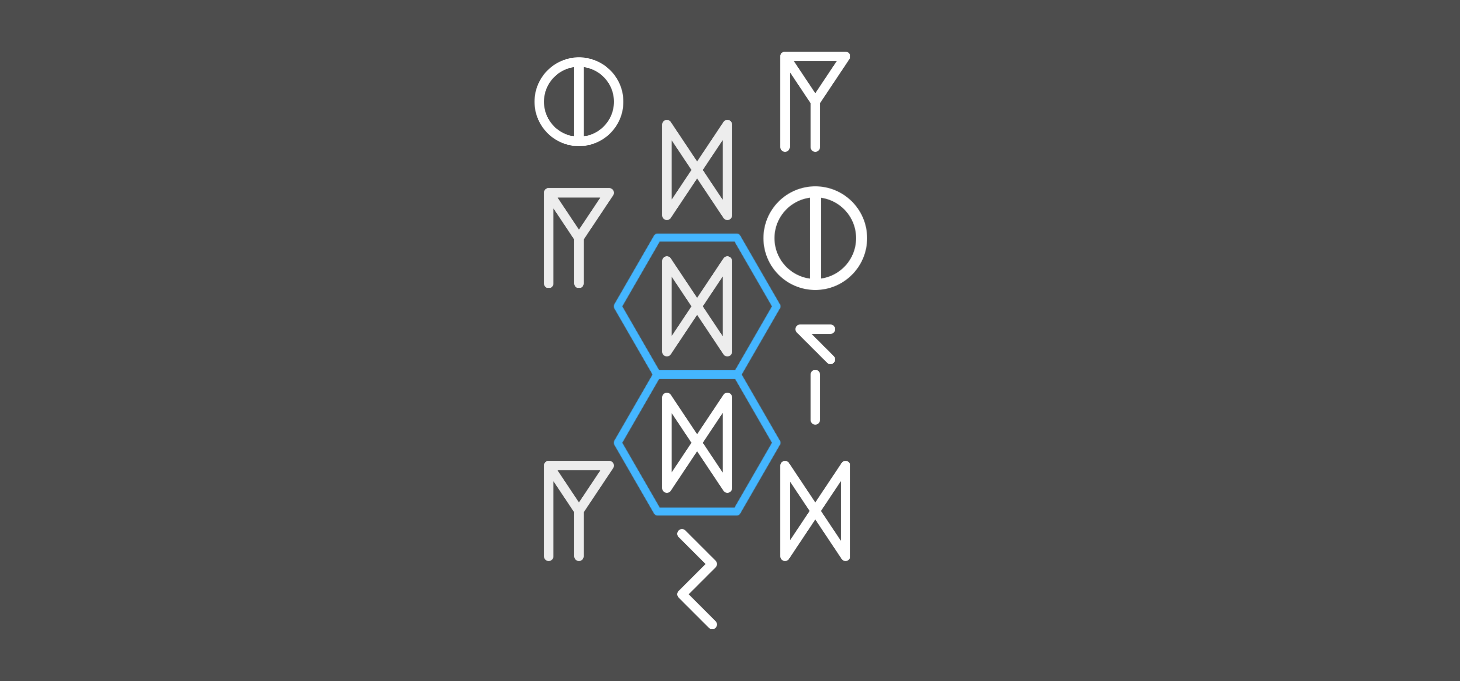
Graphics
Models were modelled in Blender, vector graphics were created in Inkscape, and smashing a pixelated noise texture (created in Gimp) over everything was frighteningly effective.
The Interact Key
E is the interact key. Pressing E can either advance the currently active dialogue, or open an in-world “puzzleboard”.
I didn’t have a global system to redirect input. The dialogue script (running on the dialogue box itself) intercepted the interact key whenever a dialogue was running, but there was no way to see if an interact keypress would intercepted there. As it is, the crosshair changes whenever you look at an interactable object, even if the interact key would be captured by the dialogue script.
Dialogue
Here’s a sample of the game’s introduction script:
@radio_up
[radio] COORDINATES: 999999° 59′59″N, 999999° 59′59″E
[radio] INCOMING CALL FROM:  [Maya Exeter]
[other] Is this thing on? [...]
This went through some bespoke parsing, which had the dubious honor of being worse than regular expressions:
if line == "":
	return false

if line.begins_with("@"):
	var command := line.substr(1)
	if command.contains(" "):
		var split := command.split(" ")
		command = split[0]
		var arg := split[1]
		return call("command_" + command, arg)
	else:
		return call("command_" + command)

if line.begins_with("["):
	var speaker_end = line.find("]", 1)
	var speaker_id = line.substr(1, speaker_end - 1)
	var text = line.substr(speaker_end + 1).lstrip(space).rstrip(space)

	speaker_reset()
	call("speaker_" + speaker_id)

	speech.text = text

	animator.stop()
	animator.play("show")
	animator.queue("tick")

	visible = true

	return true
This looked up speakers and commands as functions:
func speaker_reset() -> void:
	speaker.text = "Unspecified"
	speaker.modulate = Color(1, 1, 1, 1)

# [...]

func command_activate(name: String) -> bool:
	var any := false
	for node in $"../world".find_children(name):
		any = true
		node._activate()

	if not any:
		printerr("@activate no nodes: ", name)

	return false
In yet another massive win for Greenspun’s tenth rule, I actually used the dialogue language for the interactive puzzle boards in the world, too! These just played a specific dialogue script:
@puzzle 2-1
@activate puzzle_2-2
This had two major benefits: this just gave me automatic support for puzzle completion transitioning into a dialogue.
@puzzle 2-3
@radio_up
[other] You’ve just completed the game!
And, when creating all of the game’s puzzles (all five of them!) I could just pop up the puzzles before the introductory dialogue:
@radio_up
@puzzle 2-3
[radio] COORDINATES: [...]
This reduced the iteration cycle massively, which is one of the most effective ways to develop more game, more faster.
An interesting to think about here is that, this is effectively code. Why wasn’t GDScript up to the challenge? One reason is that I actually didn’t know GDScript supported coroutines! This code could’ve been translated into something like the following:
await radio_up()
await say(radio, "COORDINATES: 999999° 59′59″N, 999999° 59′59″E")
await say(radio, "INCOMING CALL FROM:  [Maya Exeter]")
await say(maya, "Is this thing on? [...]")
Sure, it has more cruft, but it’s still totally readable. I’m genuinely a little surprised that this is so viable. And it’s actually really easy to export a script attribute:
@export var on_interact: Script

func _interact():
	on_interact.new().activate()
You can’t create a picker for scripts that extend a specific class though, as this just shows a node picker instead. It’d be really nice to be able to Quick Load only dialogue scripts, instead of all .gd files. But this is understandably a small niche of Godot’s surface.